
Hi
There is nice commands to check share and replication issues original from microsoft to check DFS Sysvol system

Check for the SYSVOL share
You may manually check whether SYSVOL is shared or you can run the following command to inspect each domain controller by using the net view command:
For /f %i IN ('dsquery server -o rdn') do @echo %i && @(net view \\%i | find "SYSVOL") & echo
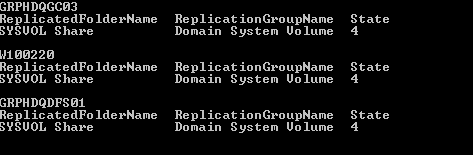
Check DFS Replication state
To check DFS Replication’s state on domain controllers, you may query WMI. You can query all domain controllers in the domain for the SYSVOL Share replicated folder by using WMI as follows:
For /f %i IN ('dsquery server -o rdn') do @echo %i && @wmic /node:"%i" /namespace:\\root\microsoftdfs path dfsrreplicatedfolderinfo WHERE replicatedfoldername='SYSVOL share' get replicationgroupname,replicatedfoldername,state
The “state” values can be any of the following:
0 = Uninitialized
1 = Initialized
2 = Initial Sync
3 = Auto Recovery
4 = Normal
5 = In Error
1 = Initialized
2 = Initial Sync
3 = Auto Recovery
4 = Normal
5 = In Error
Original post: https://support.microsoft.com/en-us/kb/2958414
 7 IT & Security