
Make sure you do backups prior to doing any changes as this solution may not be suitable for you or related to another problem ;
Problem: Witness share is not available for your Dag System;

Solution: Ensure all your permissions are correctly set in your witness share and alternate witness ;
Run the following command to identify your witness configuration
1. Exchange Powershell command to get all witness shares
Get-DatabaseAvailabilityGroup -Identity "YOURDAGNAME" -Status | fl name,servers,witnessserver,witnessdirectory,alternatewitnessserver,alternatewitnessdirectory,operationalservers,primaryactivemanager,witnessshareinuse
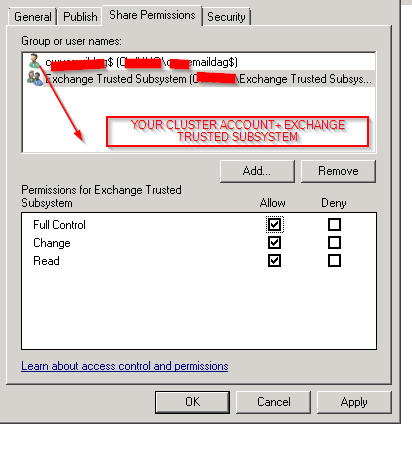
2. Connect to the Witness shares (Primary and secondary) that have the issue and Set the following permissions; Share and Ntfs must be in equal permissions and the cluster computer object must have full access + Exchange trusted subsystem ;
The account is easy to identify as the description shows as “Failover cluster virtual network name account”
Cluster Account in AD :

Permissions for Witness and alternate witness ( NTFS + SHARE MUST BE EQUAL )
3. Restart cluster service in the nodes and test if the witness is online; if not working repeat the witness share creation again & restart the cluster;

 7 IT & Security