

Problem: some services need a delayed start due to the very lack of resources
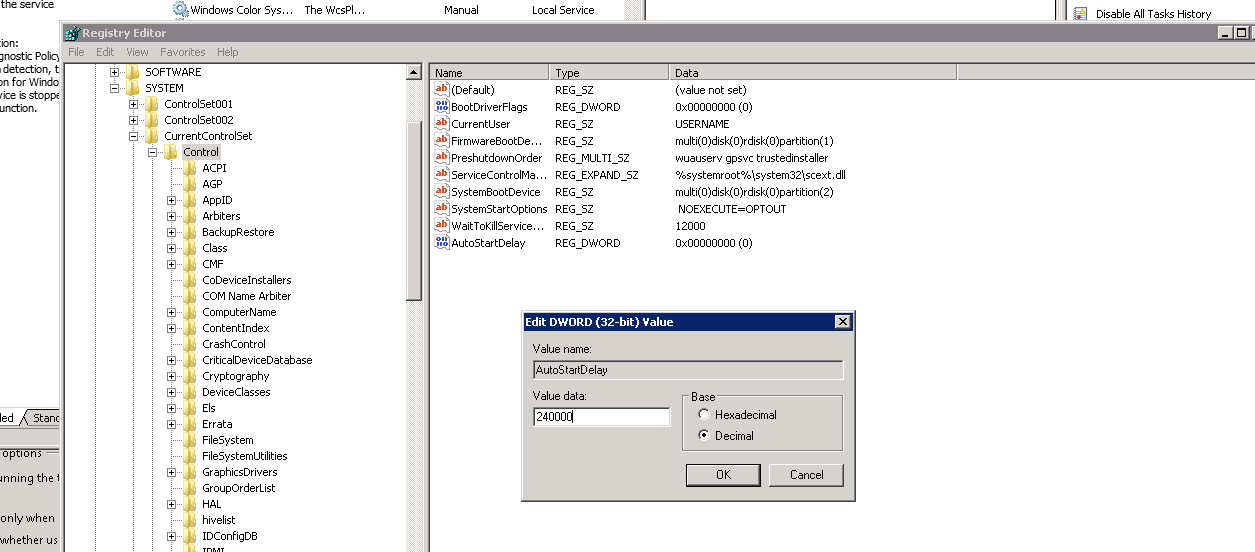
Fix: Increase the delayed automatic start registry value
Create the AutoStartDelay REG_DWORD on HKLM\SYSTEM\CurrentcontrolSet\control;
A reboot is needed in order to changes apply
Remember that this is a fix, not a solution; you must always look after upgrading your hardware and OS to be able to perform the daily task and services
Additionally, you can personalize services delay on this registry keys :
HKLM\SYSTEM\CurrentControlSet\services\<service name>\DelayedAutostart ( Can be 1 or either 0 )
HKLM\SYSTEM\CurrentControlSet\services\<service name>\AutoStartDelay ( Increase value in seconds )
 7 IT & Security