

Introduction
The dashboard plays a crucial role in bolstering email security by providing a comprehensive view of email-based threats and user interactions. This powerful tool allows security teams to enhance the organization’s overall security posture, respond effectively to incidents, and ensure alignment with compliance requirements.
Dashboard Security Benefits:
- Detect Anomalies: Quickly identify unusual patterns or spikes in email releases that could indicate a phishing attack or false positives in email filtering.
- Alert Generation: Set up alerts for specific events, such as the release of emails with low confidence levels, requiring immediate review.
- Incident Response and Management: Enables rapid response to potential security incidents and provides detailed information about emails, attachments, and URLs.
- Forensic Analysis: Trace the path of suspicious emails, understand their origin, and identify other recipients at risk.
Compliance and Reporting:
- Compliance Audits: Demonstrates compliance with regulations requiring monitoring and reporting of email security incidents.
- Historical Analysis: Understand trends over time to refine filters, policies, and enhance user education.
- Gather Intelligence: Build a picture of current threat actors and tactics by analyzing sender domains, attachment types, and URLs.
- Share Findings & Machine Learning: Collaborate with other teams or organizations and share data on emerging threats.
In essence, the dashboard provides a 24-hour generic view of released emails for quick review and can be used and pinned in Sentinel alerts. Its creation in Azure and setting appropriate permissions enable detailed analysis for enhancing security monitoring and response.
Dashboard objectives
- 24 h generic view of Released emails for quick review
- Dashboard link can be used and pinned in a Sentinel alerts
creating the dashboard
- Create the dashboard in azure and set appropriate permissions using the following query
EmailPostDeliveryEvents
| where TimeGenerated >= ago(24h)
| where Action contains "Release"
| join kind=inner (
    EmailEvents
    | project TimeGenerated1=TimeGenerated, NetworkMessageId, RecipientEmailAddress, SenderFromAddress, Subject, EmailDirection, EmailActionPolicy, ConfidenceLevel, AttachmentCount, UrlCount, UserLevelAction, UserLevelPolicy
) on NetworkMessageId
| summarize by ReleaseTime=TimeGenerated, EmailReceivedTime=TimeGenerated1, RecipientEmailAddress, SenderFromAddress, Subject, EmailDirection, EmailActionPolicy, ConfidenceLevel, AttachmentCount, UrlCount, UserLevelAction, UserLevelPolicy
Dashboard looks

Setting up link in alerts
Creating an analytics rule that triggers an alert for specific conditions, such as the detection of a released email, and includes a link to a dashboard for detailed analysis, is a strategic approach to enhance security monitoring and response.
This method allows security teams to rapidly access detailed insights and context regarding the alert without having to manually search for the information.
CloudAppEvents
| where ActionType contains "QuarantineReleaseMessage"
| extend
    NetworkMessageId = tostring(RawEventData.NetworkMessageId),
    ReleasedEmailDate = TimeGenerated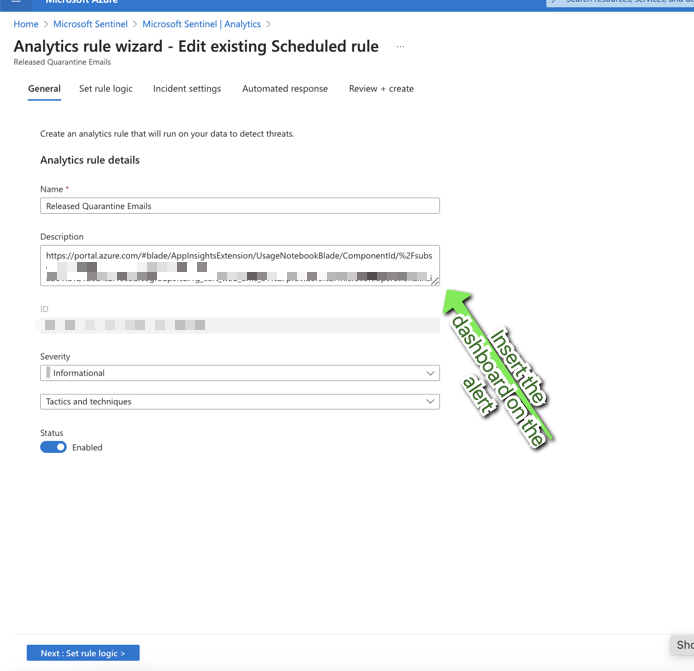
 7 IT & Security