

- Is huntres for me?
- Excellency Maturity models in addition with Huntress
- What is an EDR ?
- Why Invest in MDR like Huntress
- Our testimony to Huntress MDR ( Midsize company 1500 users & 600 Devices )
- Hidden time & money costs of the pesky Malware’s
- Testing huntress – Infecting a device – Containing initial access
- Reporting is made easy with Huntress
- Monitor remote connections devices & MFA disabled accounts to reduce risk
- 365 ITDR – Unwanted access
- Monitor Risky sign ins / VPNS with Unwanted access
- Feature – Tamper protections on Huntress
- Feature – Escalations
- Feature of MDR – Collected files – Real SOC team reviewing our scripts
- Feature : Signals
- Feature : Monitoring Binaries & Auto runs
- Huntress Human Additional Value – Webinars , Huntress Hub and events
Is huntres for me?
Start your trial if you are convinced that that is the case using the next link https://www.huntress.com/start-trial

We have prepared a compressive pointers for combining huntress with other platforms or methodologies to achieve the best cybersecurity resilence .
Huntress is the perfect fit for you if taken advantage of SIEM , EDR & Identity ITDR protection. ( Azure AD , 365 & Defender XDR enviorments are perfect fit for the huntress team ) . Stepping away from traditional cybersecurity response & moving forward to more advanced cybersecurity models with Huntress platform taking away the noise and focusing on what matters
Huntress will offer you full protection in your Identities, Endpoints & Network , 365 x 24
Combine the power of Managed EDR , Office 365 protection & SIEM to get the max out of your huntress platform


cyber standard Resilience additions with huntress
Web Filtering and DNS Protection
- DNSFilter integration with Huntress SIEM to block malicious domains, securing web traffic.
Azure AD Identity Protection and Conditional Access
- Enforces location-based and risk-based access policies to secure identity access.
Email Security with AI Capabilities
- Solutions like Ironscales and Darktrace use AI to detect phishing and email compromise.
CIS Hardening for Endpoints
- Ensures endpoints align with CIS benchmarks, improving system security.
BYOD Policies for Personal Devices
- Secures personal devices accessing company resources, enforcing security standards.
App Whitelisting
- Controls executable applications, blocking unauthorized software on endpoints
Excellency Maturity models in addition with Huntress
- Data Protection Policies and DLP Solutions
Prevents unauthorized data movement, safeguarding sensitive information. - NIST / ISO Compliance Frameworks
Establishes security standards that align with regulatory frameworks like NIST and ISO. - Phishing Simulations
Tests user awareness and security effectiveness against phishing attacks. - Huntress SIEM Add-on for Threat Hunting and Analytics
Adds threat hunting and analytics for real-time threat detection. - Zero Trust and Security by Design
Enforces the principle of “never trust, always verify” for access and system design. - Information Security Risk Management
Documents risk management strategies to align with threat intelligence. - Annual or Semi-Annual Penetration Testing
Regular testing identifies and mitigates vulnerabilities. - Asset Management and Attack Surface Reduction
Maintains real-time asset inventory, minimizing attack surface. - Threat Intelligence and Technology Monitoring
Uses intelligence to stay updated on emerging threats and attack methods. - Business Process Mining and Hardening
Analyzes and strengthens critical business processes against security threats. - User Behavior Analytics (UEBA)
Detects abnormal user behavior, helping identify potential insider threats. - Advanced Vulnerability Management and Patching
Proactively scans and patches vulnerabilities to secure endpoints. - Privileged Access Management (PAM)
Controls and monitors access to critical assets with privileged accounts. - Incident Response Playbooks and Crisis Simulations
Prepares for incidents through detailed response plans and simulations. - Third-Party Risk Management
Assesses risks from vendors and third-party software to prevent supply chain attacks. - Endpoint Detection and Response (EDR) Automation
Automates response to endpoint threats, improving containment and recovery. - Network Micro-Segmentation
Limits lateral movement in the network, isolating sensitive resources. - Deception Technologies (Honeypots)
Deploys decoys to detect and distract attackers moving within the network. - Continuous Threat Modeling
Regularly evaluates potential attack vectors for new and existing systems. - Supply Chain Security Assessments
Evaluates vendor security practices, reducing risk from third-party products. - Automated Backup Integrity Checks
Verifies backup quality and performs restore tests for data resilience. - Red Team and Purple Team Exercises
Simulates attacks and defense to improve detection and response capabilities. - Data Exfiltration Detection and Response
Monitors and blocks unauthorized data transfers out of the organization. - Continuous Staff Training and Social Engineering Awareness
Trains staff to recognize social engineering and phishing tactics. - Digital Rights Management (DRM)
Controls data usage and sharing, securing sensitive information. - Quantum-Safe Cryptography Preparations
Prepares for quantum threats by evaluating encryption that resists quantum attacks.
What is an EDR ?
The modern workplace, with its increased attack surface, necessitates robust security measures like EDR. EDR monitors and alerts to malicious activity, providing visibility and detection capabilities across endpoints.
EDR solutions provide granular visibility into endpoint activity, enabling threat detection and response. They offer protection against known and unknown threats, deeper threat intelligence, and faster incident response.
EDR monitors endpoint activity, detects suspicious behavior, and provides remediation suggestions. It establishes a baseline of expected behavior to identify anomalies.
Why Invest in MDR like Huntress
Huntress Managed EDR reduces alert fatigue and lowers costs with a fully managed solution. It offers a human-managed approach, 24/7 coverage, and a low false positive rate, ensuring critical events are not missed.
Huntress is praised for its ease of use, setup, and doing business with, making it a top-rated and trusted solution for small businesses.
Top rated MDR – Huntress or top choice
- Managed EDR
- Managed ITDR ( 365 Identity )
- Managed SIEM
- Managed Information security training
- Access to huntress hub ( training resources)
- Webinars & Engagement ( Huntress Hub )
- Excellent Customer support
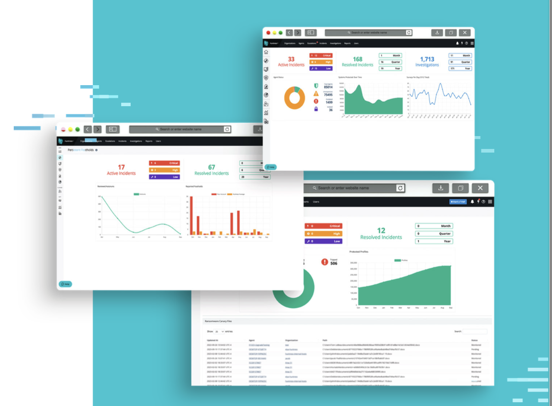
- 24/7 & 365 Protection: MDR solutions offer around-the-clock monitoring and response, stopping malware infections before they escalate.
- Expert Incident Response: MDR teams consist of cybersecurity experts trained to respond to a wide range of security incidents. Their experience reduces the complexity of remediation efforts and accelerates recovery time by employing well-tested response playbooks.
- Reduced Recovery Efforts: MDR services can contain and isolate threats in real-time, reducing the need for extensive manual intervention and lowering overall remediation efforts.
- Cost Efficiency: By minimizing the time and resources spent on recovery, MDR helps prevent large-scale infections and the associated financial burden. The cost of prevention through MDR is significantly lower than the cost of recovery through manual methods.
- Lower Resource Demands: MDR services minimize the time and resources needed from internal IT or security teams. Instead of relying on manual monitoring or in-house efforts to manage threats, MDR takes over the heavy lifting, freeing up internal resources to focus on other strategic priorities.
- Minimized Financial Impact: A successful cyberattack can result in millions in direct costs (data recovery, legal fees, and fines) and indirect costs (lost business, customer trust, and brand reputation). By catching threats early, MDR solutions reduce the likelihood of such large-scale financial consequences.
- Clear Visibility: MDR solutions provide comprehensive reporting, giving you a clear view of threats and incidents, along with actionable insights. This helps certitude understand their risk landscape and better manage their security posture.
- Compliance Support: MDR services help with compliance requirements by maintaining logs and incident reports that align with regulations like GDPR. This can make audit preparation and reporting significantly easier.
Our testimony to Huntress MDR ( Midsize company 1500 users & 600 Devices )
Huntress team provides support and any session on demand using their helpdesk if the team were to require escalating any type of alert that is suspicious on Devices or Identities, this also includes protecting legacy Servers (legacy systems). Huntress was very easy to deploy in no time via Intune and took no more than 2 days to be fully functional
Together, these tools empower the IT team and stakeholders with real-time insights and enhanced control. On-demand reporting keeps decision-makers informed, while antivirus compliance ensures endpoint protection is maintained across the organization.
Huntress offers advanced capabilities like the isolation of infected entities, even during out-of-hours incidents & including legacy Server environment providing around-the-clock protection and minimizing disruption.
The establishment of this ecosystem is not just about the tools—it reflects our company commitment to proactive, sustainable, and effective cybersecurity.
By leveraging advanced technologies and expert support, we’ve built a security framework that ensures real-time protection, rapid detection, and incident response, securing
Hidden time & money costs of the pesky Malware’s
Managing infections manually across multiple devices proved to be highly resource-intensive, both in terms of personnel hours and courier services can be overloading
Its estimated that wiping or remediating completely a malware or infection can drag costs of 60 minutes of engineering time + Couriers if other solutions to remote wipe are not in place . With huntress we can establish very quickly if persistence is on the device and if we have any queries we can just reach the support team which is super effective
Testing huntress – Infecting a device – Containing initial access
A simulated ransomware attack was conducted to test the effectiveness of , particularly the Huntress Managed Detection and Response (MDR) platform.

Huntress triggered a high-priority SMS alert after analyzing several alarms. The Huntress platform effectively blocked the device and isolated it to prevent further damage. Funny note: The huntress Team realized I was testing this basing on the behaviors that I made myself ( I was not a good hacker! )
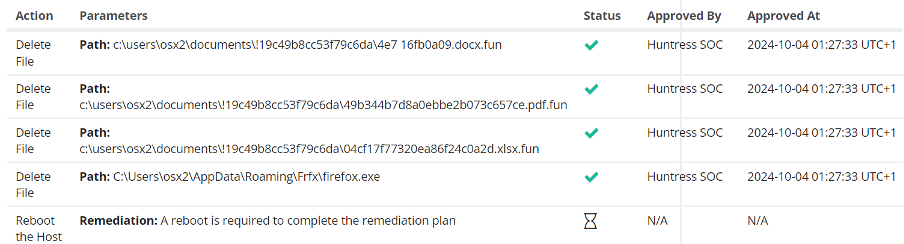
The huntress team produced a remediation plan for the infected device in order for the IT Team to follow and mitigate the damage . Using their canary’s they were able to contain the malware incident & they produced a very comprehensive report .
EDR (Canaries, Autoruns, External Reckon)
- Persistent Footholds
- Purpose: Huntress monitors Windows and Mac systems for signs of hidden persistent threats, such as backdoor or unauthorized software, which often go unnoticed.
- Benefit: It provides actionable instructions to remove these footholds, reducing the risk of attackers maintaining prolonged access.
- Managed Antivirus
- Purpose: Centralizes the management of Microsoft Defender, optimizing frontline virus protection with enhanced visibility and control.
- Benefit: By managing Defender, Huntress strengthens existing antivirus defenses, ensuring consistent application and visibility across endpoints.
- Ransomware Canaries
- Purpose: Early ransomware detection by deploying files (“canaries”) that trigger alerts if encrypted.
- Benefit: Enables faster detection and containment of ransomware before it spreads, minimizing potential damage.
- External Recon
- Purpose: Identifies vulnerabilities on external attack surfaces, including open ports, remote desktop services, and unauthorized services.
- Benefit: Helps secure perimeter defenses and reduces risks from shadow IT, ultimately strengthening network security against external threats.
- 24/7 SOC Coverage
- Purpose: Provides round-the-clock monitoring by a Security Operations Center (SOC), staffed with experts who analyze and respond to potential threats.
- Benefit: Adds a layer of expert oversight, ensuring that threats are identified and remediated in real-time, beyond what automated tools alone can achieve.
Reporting is made easy with Huntress
Huntress is able to produce reports on demand for stakeholders or yourself including all data . It has options to send this Monthly and weekly , In our case its now very easy to report to our board of directors what’s going in within our enviorment.
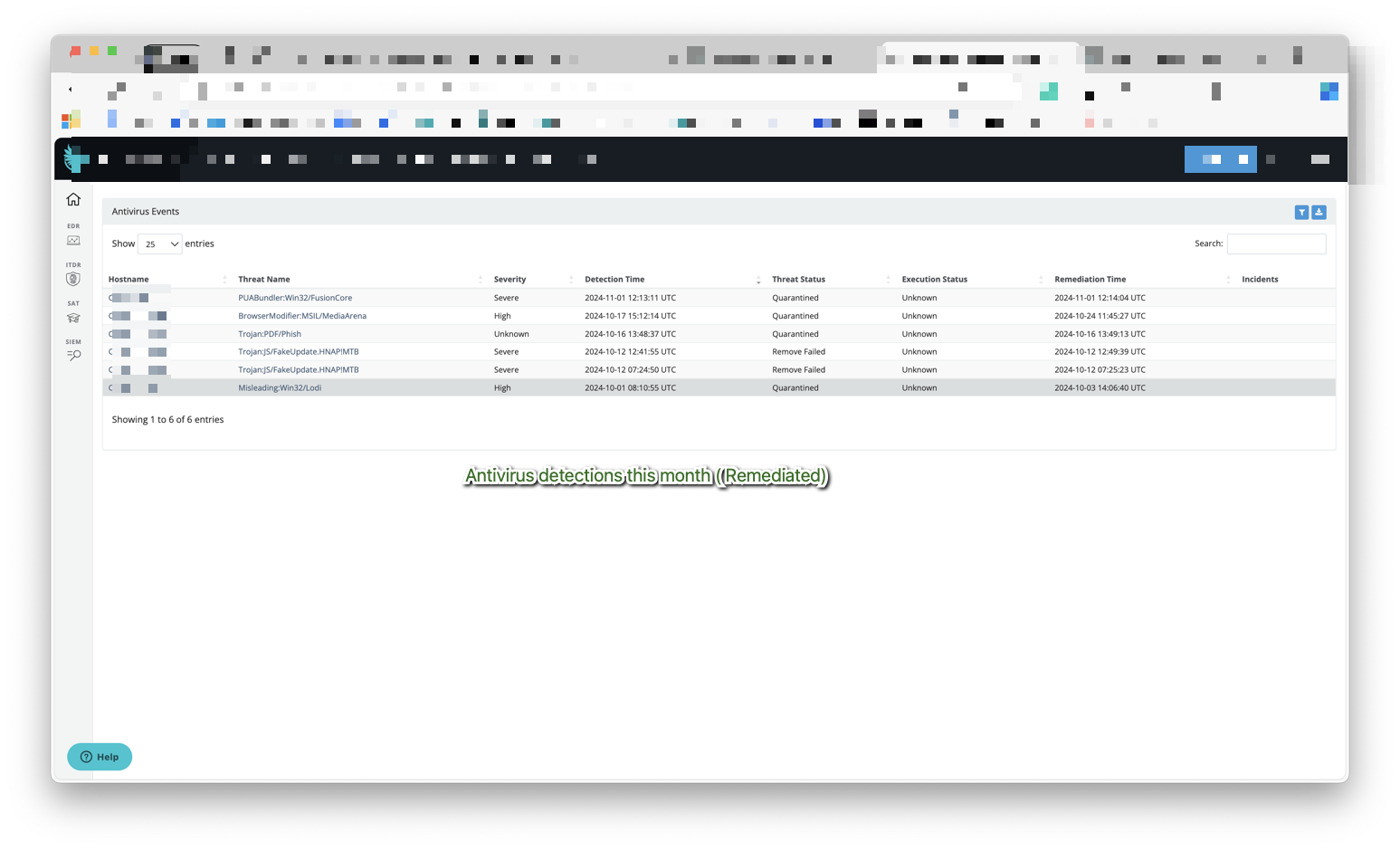
Huntress also reports what your antivirus is doing and number of incidents , we have used the managed antivirus portal that allow us to list in 1 page all our malware remediated incidents by our EDR
In our case for example detected in a legacy server an unwanted software after we enforced the compliance policies

Monitor remote connections devices & MFA disabled accounts to reduce risk
- With huntress monitoring remote connections to your host is vital , Living out the land other techniques are being used as lateral movement and to escape the cybersecurity teams eye .
- Monitor your MFA disabled accounts , remediating risk accordingly
In our case this was handy to detect IT test accounts that were somehow left unused or with MFA still not enabled

Risk Detection (Password Files Detection)
Huntress MDR services not only ensure antivirus compliance across all devices but also detect risky documents and credentials, such as passwords stored in unprotected formats. Advanced analytics can identify malicious or compromised files, enhancing overall protection via the Huntress Team platform
Feature: AV Policy enforcement – Additional compliance
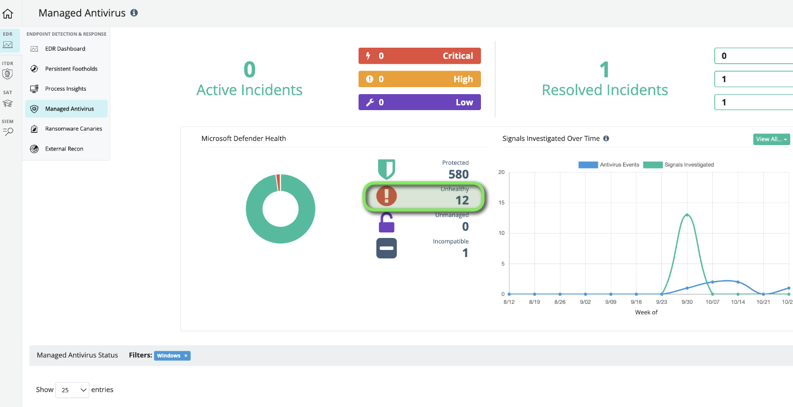
In our case we were having issues enforcing such policies in our devices via Intune , huntress has reduced our 60 risky devices to 10 just enforcing the policies
- Enforce compliance in AV settings
- Enforce settings as PUA – Installing software only from the store & scheduled scans or Smart screen


365 ITDR – Unwanted access
Behavioral Analytics: ITDR monitors user activities and flags anomalies based on user behavior patterns. This includes activities such as unexpected login times, unusual IP addresses, or atypical device access.
Suspicious Login Alerts: Real-time alerts for unusual sign-ins (e.g., from new geographic locations or unfamiliar devices) that help IT teams quickly identify unauthorized access attempts.

Monitor Risky sign ins / VPNS with Unwanted access
- With the introduction of conditional policies in Azure ad it is well known VPNS can be useful for hackers into our enviorments pretending to be our users
- Huntress monitors any sessions related with risky vpns or other types of session that might bring risk in your organization
In our case huntress was handy to detect in one of our users a risky vpn that was compromising the user’s privacy

Feature – Tamper protections on Huntress
- Huntress offers tamper protection setting so it is difficult to uninstall or remove the platform from endpoints
Feature – Escalations
An Escalation is used to notify Huntress account administrators that something requires their attention.
Our experience with Escalations have been mostly for 365 VPNS or risky sign ins , this has become handy so we have got power of decision following huntress findings and we were able to follow up with users confirming legit access

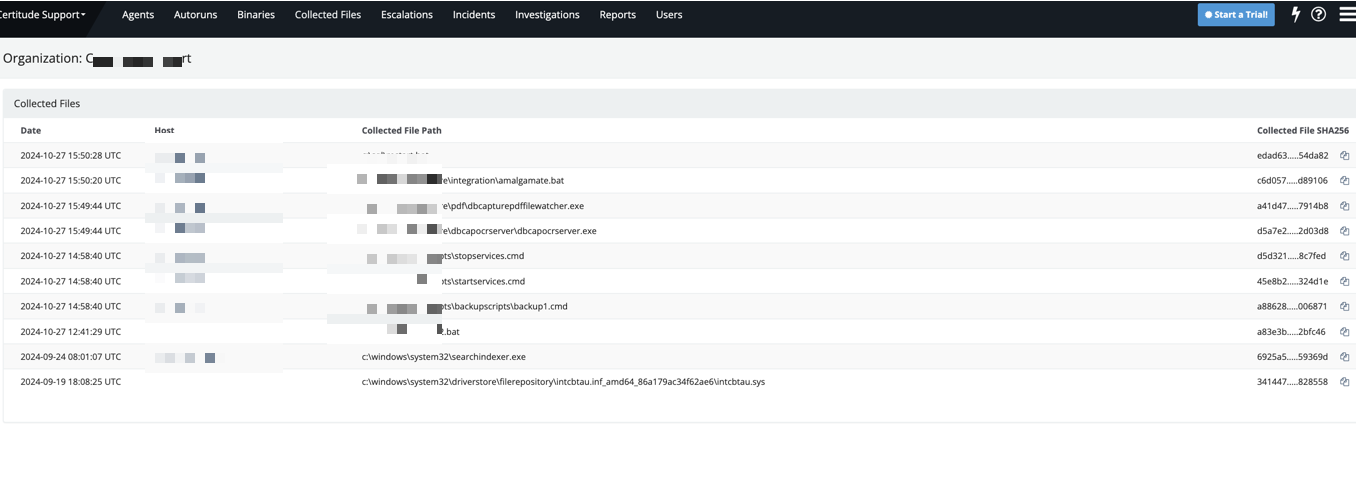
Feature of MDR – Collected files – Real SOC team reviewing our scripts
In our experience when we started onboarding our legacy servers, the huntress team started to watch our scripts and collect them in order to check if they were not malicious , there is real people and experts behind the wheels its not AI
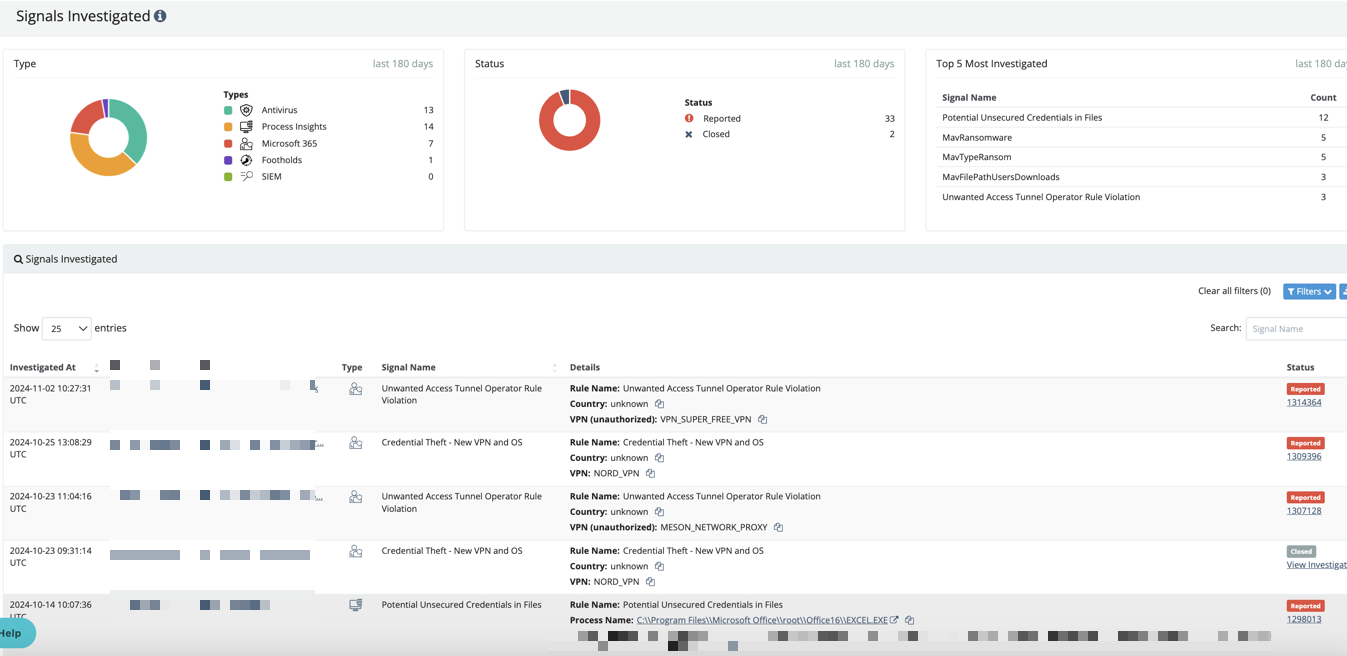
Feature : Signals
For our team it was very useful to see all huntress signals that were investigated
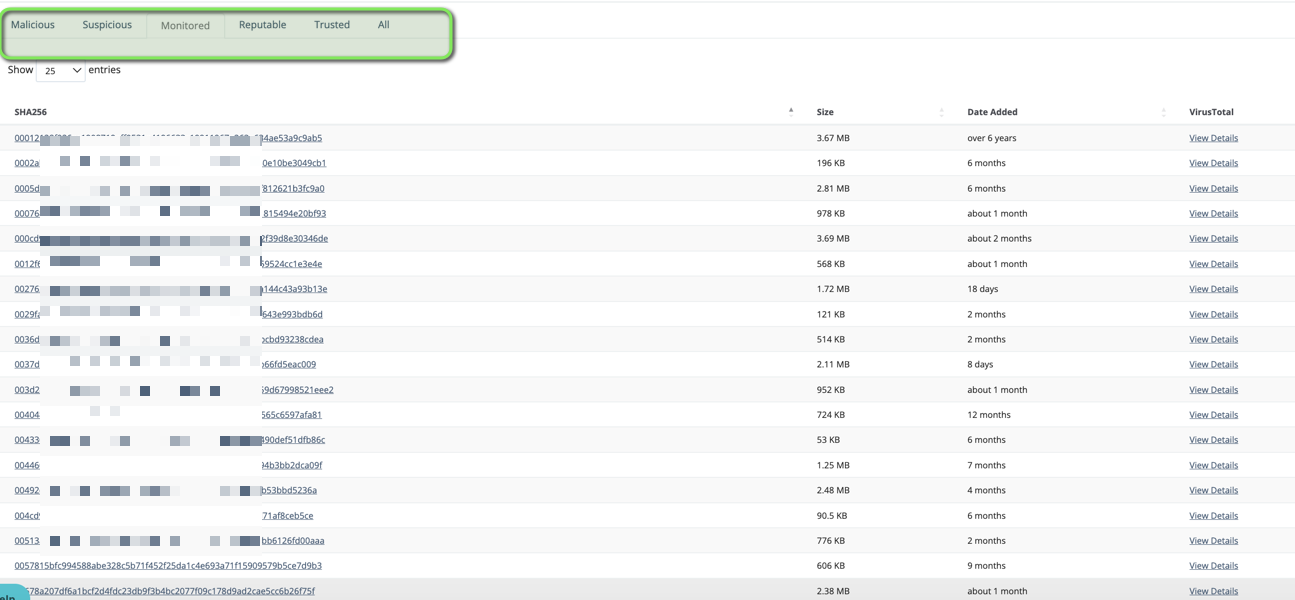
Feature : Monitoring Binaries & Auto runs
Since the day one we realised how powerful was to have the huntress team behind our servers and endpoints with the Binaries & Auto run feature
Purpose: Huntress monitors binaries (executable files) on systems for any suspicious or unauthorized modifications, additions, or behavior patterns. This includes keeping track of critical system files, user-installed applications, and executable scripts that might be leveraged by attackers to establish a foothold or execute malicious code.
Benefit: By closely monitoring binaries, Huntress can detect unauthorized software installations, tampered files, or new executable files that deviate from the norm. This proactive approach helps identify potential threats early, especially if malicious actors attempt to introduce or alter binaries to bypass traditional defenses. It allows for swift investigation and response, reducing the chance for malware or persistent threats to compromise the system.
Binaries Feature
Auto Run Feature
Purpose: Huntress monitors and detects changes in auto-run entries—programs or scripts that automatically execute at system startup. This feature targets common persistence mechanisms used by attackers to establish footholds on devices.
Benefit: By identifying unauthorized auto-run entries, Huntress enables quick detection and removal of persistent threats that would otherwise restart with the system. This significantly reduces the chances for malware to maintain control over infected systems and supports a clean, secure startup environment.

Huntress Human Additional Value – Webinars , Huntress Hub and events
Our IT team has been able to visit huntress roadshows and interact with huntress experts in webinars at a non additional cost . Huntress HUB events and webinar make the perfect fit for your company or business. engagement is key , and Huntress is that human value and connection required at your side
Webinars with huntress
Huntress hosts regular webinars covering various cybersecurity topics, including threat detection, incident response, and best practices. Notable series include:
- Tradecraft Tuesday: Monthly sessions that delve into hacker techniques and defense strategies. Huntress
- The Product Lab: Discussions on product updates, cybersecurity trends, and live Q&A sessions with Huntress co-founders. Huntress Webinars
Huntress Hub
The Huntress Hub is an all-in-one partner enablement portal offering, I have personally used their slides and info to produce this Webpost
- Training Courses: Comprehensive modules on Huntress products and cybersecurity concepts.
- Marketing Resources: Co-brandable content and customizable campaigns to support business growth.
- Product Information: Access to the latest updates and support documentation

